Music Folder Utils
Note: I now primarily use beets for music library management. MFUtils remains available for specific desktop-integration needs, but for most library workflows I recommend evaluating Beets first.
Your music collection shouldn't look like a junk drawer. If your library is full of "Track01" files and folders named New Folder (7), you're doing it wrong — but you don't have to live with that mess.
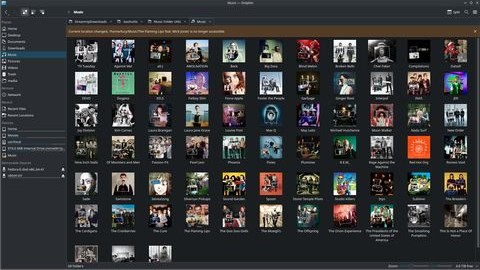
MFUtils is my answer: a pragmatic, conservative tool that enforces good metadata, extracts cover art so your file manager actually shows album covers, and reorganizes files into a sane Artist/Album layout while refusing to clobber your data.
Why this matters:
- Ownership: if you own the files, you should be able to browse them like a library, not a landfill.
- Safety: automated scripts that move thousands of files should be conservative and observable.
- Desktop integration: folder art actually matters when you use a visual file manager.
What it does:
- Syncs tags against MusicBrainz before moving files.
- Extracts embedded art and writes it where GNOME/KDE will use it for folder icons.
- Reorganizes into
Artists/Artist/Albumwith safe heuristics. - Creates
Albums/andTracks/symlink views so you can browse in multiple ways without duplication.
Implementation notes:
- Rewritten in Rust because I don't trust brittle shell scripts to safely run on tens of thousands of files.
- Parallel processing for speed, explicit error handling for safety, and validation on import to keep junk out.
Use it like this:
mfutil all ~/Music          # sync tags, reorganize, extract art, create symlinks
mfutil sync ~/Music         # just sync metadata
mfutil import ~/Downloads/Music ~/Music
mfutil art ~/Music
Install locally:
cargo install --path .
Project lives under anoraktrend on GitHub/Codeberg. It's GPLv3 because this is software for people who want to own their media, not hand it over to a platform.
-# Unfortunately, this project is abandoned. Long live Beets.